← Chase Dimick / Portfolio
UX Case Study, Threat Intelligence Platform

Physical Security
Intelligence

Near real-time threat intelligence for security teams in the field and at command centers, one shared operational picture across devices.

ZeroFox Physical Security Intelligence
Role
Lead Designer
Platforms
Mobile & Desktop
Company
ZeroFox
Status
Shipped · Globally Adopted
Focus
Strategy, UX, UI
S Situation

Security teams needed reliable intelligence
wherever they were operating

Physical security teams, executive protection details, corporate security operations, federal agencies, work in a world where conditions change by the minute. A protest reroutes a motorcade. A shooting closes an airport. A downed power line cuts a planned route. The product had to help field personnel and command-center teams understand emerging threats without overwhelming them during time-sensitive situations.

Two very different environments needed one operational picture. Field personnel needed near real-time information on mobile devices, while command-center teams needed a broader desktop view across cities, regions, and countries. Intelligence flowed from open sources, official channels, and monitored dark web forums, but raw feeds are noise. Every incident had to be analyst-reviewed and verified before reaching the teams who act on it.

The project began under an aggressive timeline, with development underway before design had been fully involved. Interviews and early-build observations revealed that the proposed experience did not align with how security professionals actually located, assessed, and communicated threats.

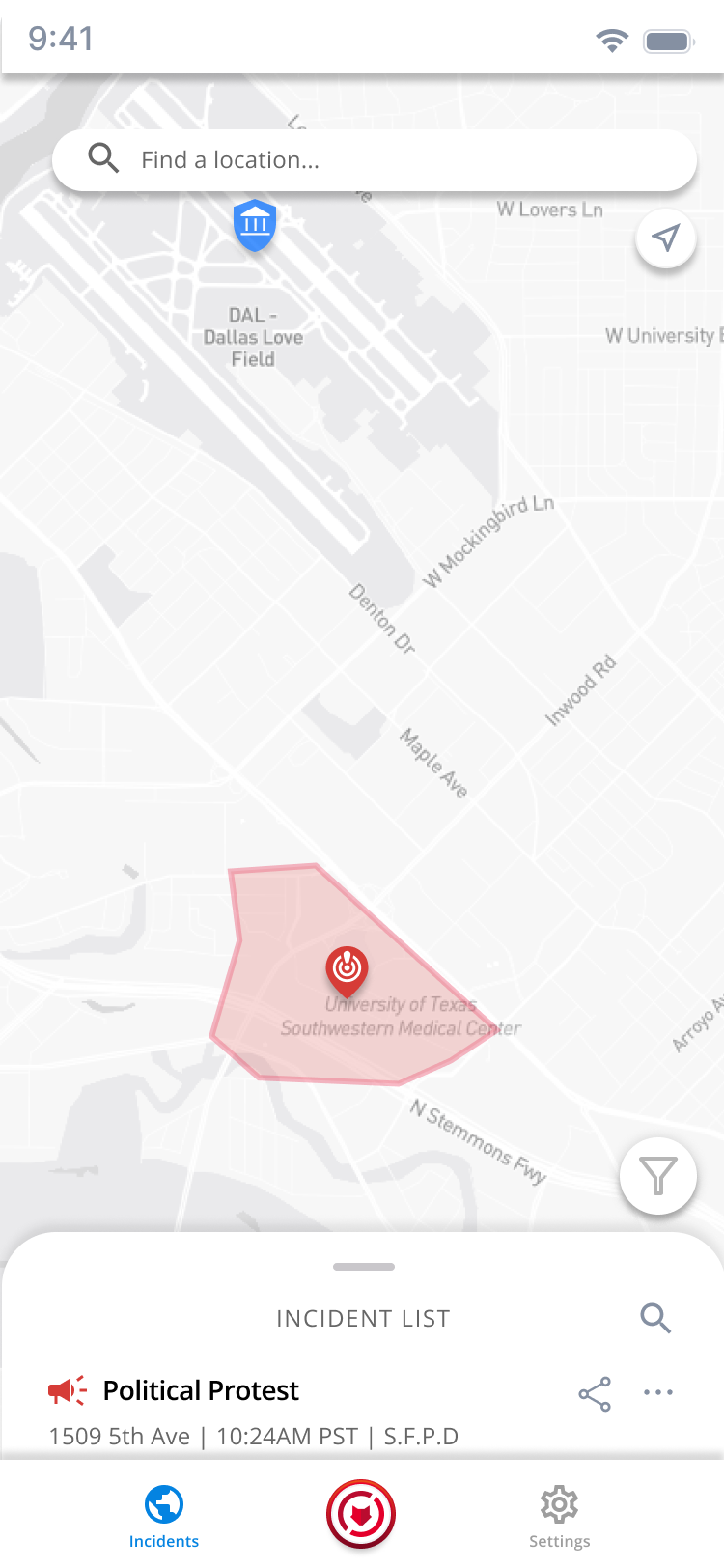
PSI mobile app: Dallas incident map with a verified political-protest zone and incident list
Verified incidents on a live map. A protest zone near a planned route, spotted before the team arrives.

"We're gonna need a bigger screen."

Command-center analyst, during usability testing
Threat Intelligence Mobile & Desktop Federal & Enterprise OSINT Geospatial UX Real-Time Alerts
T Task

Deliver verified intelligence
without the noise

I was the Lead Designer taking Physical Security Intelligence from an unvalidated early build to a shipped product. The platform needed to accomplish several things simultaneously.

Fast Access in the Field

Give field personnel timely intelligence on mobile devices without calling headquarters, in situations where conditions change rapidly.

Confidence in Verification

Make it unmistakable that every incident has been manually assessed and verified by analysts, trust is the product.

Relevant Filtering

Let teams focus on threats within their operating area, by threat type, geography, and time window, instead of drinking from the firehose.

Team Communication

Move findings cleanly between field personnel and the command center, sharing an incident had to be as fast as finding it.

Two Environments, One Picture

Serve the field on mobile and the command center on desktop with the same information model, not two diverging products.

Calm Under Pressure

Present severity, timing, and geographic impact clearly during time-sensitive situations, informative, never alarmist.

My Role

My scope spanned the full design process: stakeholder and user interviews, persona development, a mobile-first design strategy executed with front-end developers, rapid prototype testing with potential users, and the high-fidelity design of both the mobile and desktop experiences. I organized the work around decisions, not deliverables, each design response connected observed user behavior to a specific product decision.

A Action

A design process built on
evidence from the field

01

Discovery & Course Correction

Development had begun under an aggressive timeline before design was fully involved. Interviews and early-build observations revealed the proposed experience didn't match how security professionals located, assessed, and communicated threats, lightweight discovery prevented expensive rework.

02

User Research & Persona Development

Interviews with potential users and stakeholders, executive protection details, corporate security teams, command-center analysts, consistently emphasized field access, verification confidence, relevant filtering, and team communication.

03

Mobile-First Design Strategy

Because field settings were where information changed fastest, I emphasized a mobile-first strategy executed closely with front-end developers. This let us rapidly generate and test designs with potential users, iterating on real builds instead of static mockups.

04

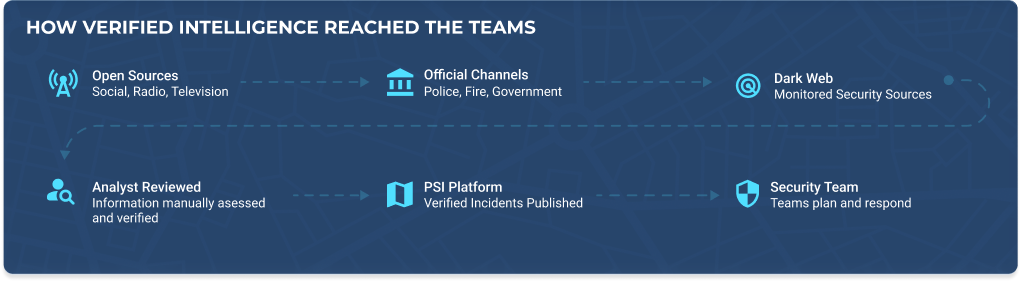
The Verified Intelligence Pipeline

Open sources (social, radio, television), official channels (police, fire, government), and 500+ monitored dark and deep web sites feed analyst review. Only manually assessed, verified incidents publish to the platform, the UX makes that chain of custody visible.

05

Testing Revealed a Second Environment

Office-based teams monitored more incidents across larger geographic areas than a mobile view could serve. The decision: include a desktop experience in the MVP, wider map, persistent incident list, expanded filtering, regional visibility, while preserving the mobile information model.

06

High-Fidelity Design, Both Platforms

A performant map experience, location toggle and manual search, incident filters, expandable incident lists, and share flows, designed so information is accessed efficiently and moves cleanly between the field and the command center.

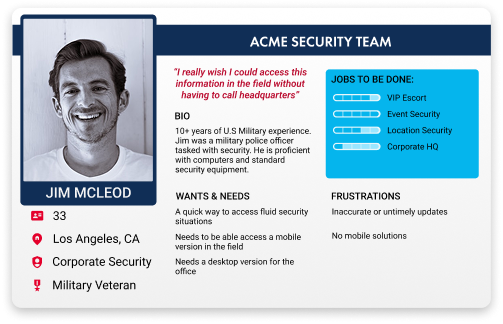
User Persona
Field-analyst persona: Jim McLeod, ACME Security Team, corporate security, military veteran, needs fast mobile access to fluid security situations
How Verified Intelligence Reached the Teams
Intelligence pipeline: open sources, official channels and dark web are analyst reviewed, published to the PSI platform and reach the security team
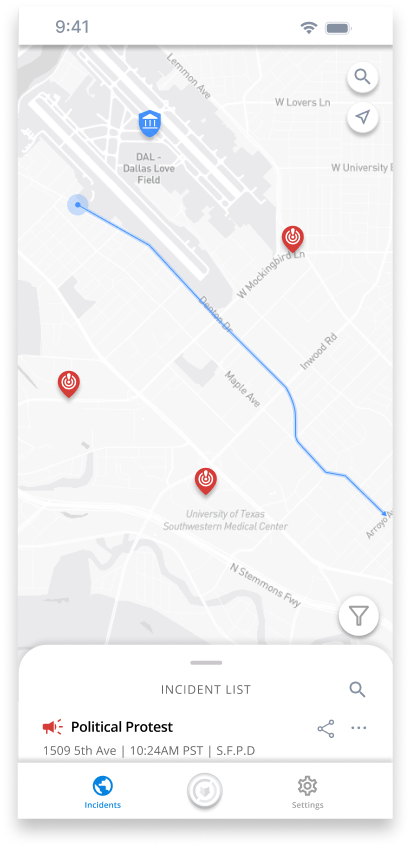
User Scenario, Moving a VIP Through a Changing City
PSI mobile app: safe route mapped between verified incidents in Dallas

A security team lands at Dallas Love Field and must identify a safe route to an event while protest conditions across the city change. Verified incidents appear as map pins; the incident list surfaces what matters, a political protest, verified by agents and the route adjusts around it.

Users could toggle their location on or off, or search a location manually. Filters and a performant map kept information timely; incidents could be shared with team members in the field or at the command center, everything a team needs to build a full picture of the situation.

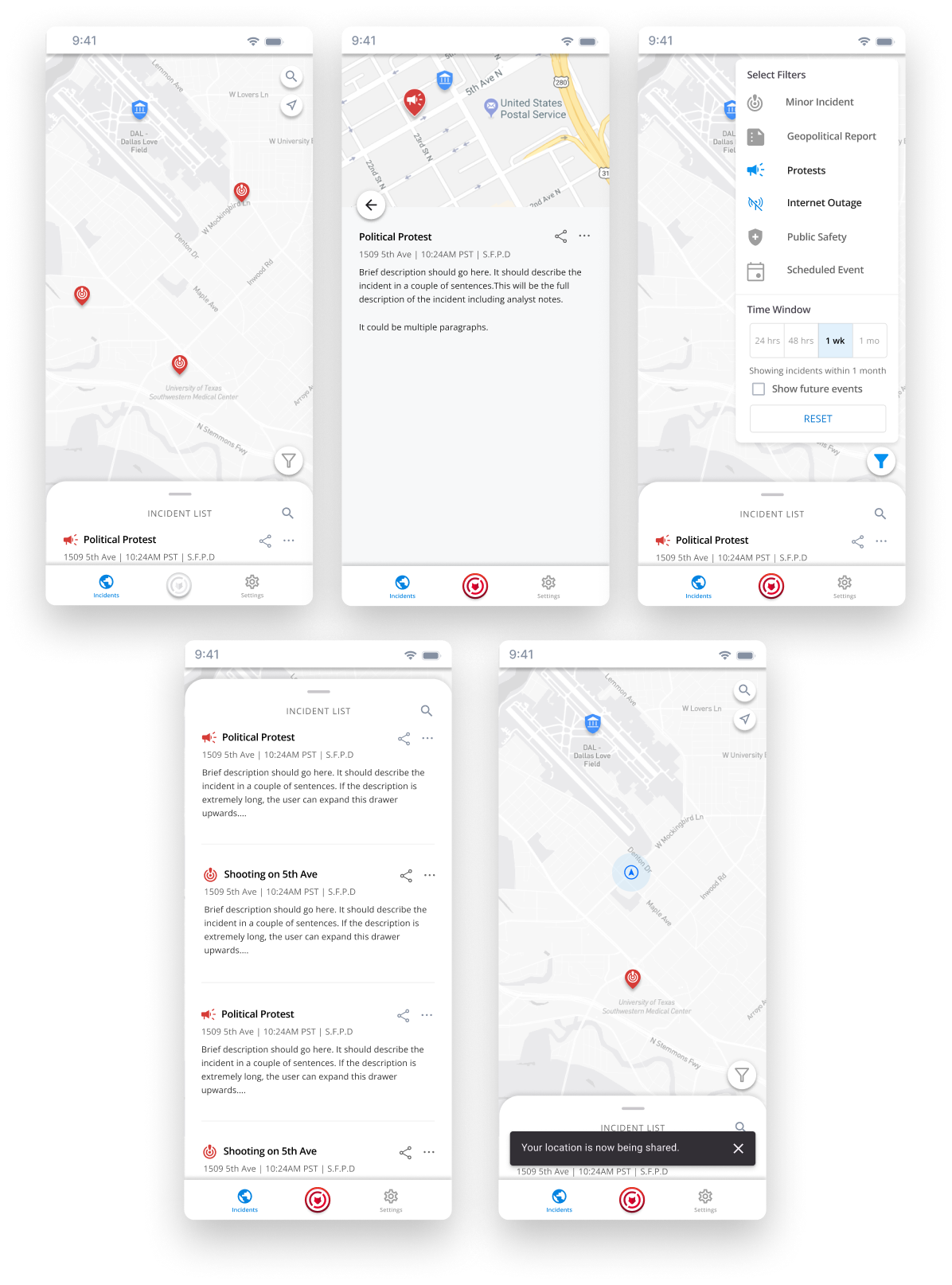
The Mobile Experience
PSI mobile screens: incident map, verified incident details, filters, extended incident list and location sharing
I wanted a straightforward system built on a familiar landscape of icons, filters, and time windows. The monochromatic map draws contrast with impact areas, which are brightly colored, and users could toggle their location with other team members.
The Desktop Command-Center View
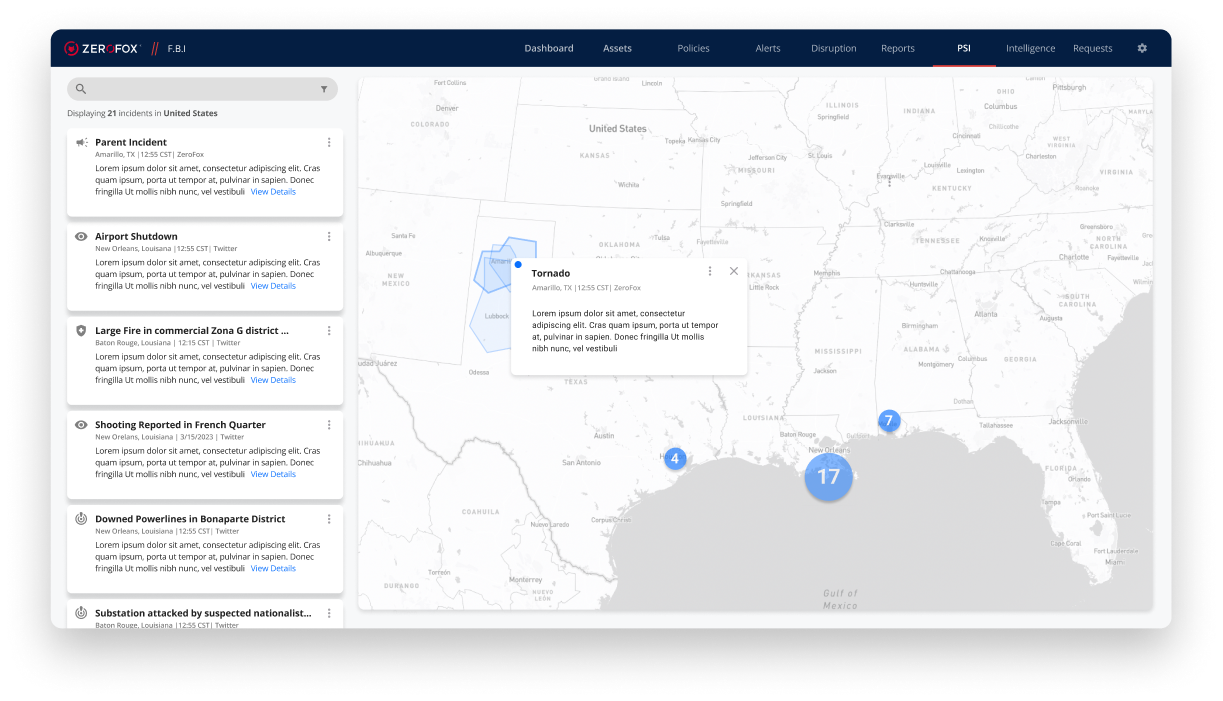
PSI desktop command-center view: regional incident map of Texas with persistent incident list
Command-center teams often monitor large areas with multiple incidents across different categories. The large numbered icon shows the cumulative incident count for a general area, breaking into more detail as the user zooms in.
A Evidence-Driven Decisions

Every design response tied to
observed user behavior

Rather than treating research as a phase, I used it as a running ledger: evidence, decision, design response. These are the decisions that shaped the product, each one traceable to something we saw users do.

Prioritize Mobility in the Field

Field situations change rapidly, mobile-first design with rapid build-and-test cycles meant the product matched the pace of the work, not the other way around.

Verified Incidents Only

Every incident on the map has been analyst-reviewed, timing, severity, location, and geographic impact. No raw feeds, no unconfirmed chatter reaching a protection detail mid-operation.

Location-Aware, Never Location-Forced

Users toggle location sharing on or off, or search any destination manually, supporting advance work on a city the team hasn't landed in yet.

A Desktop Experience in the MVP

Command-center teams monitor more incidents across larger areas. The desktop view added a wider map, persistent incident list, expanded filtering, and regional context, same information model as mobile.

Sharing as a First-Class Action

Incidents share directly from the map and list, field to command center and back, because a threat one person sees is a threat the whole team plans around.

Outcomes
R Result

One shared operational picture
across devices

Physical Security Intelligence was successfully adopted by the F.B.I., Army C.I.D., and many other corporate security teams on a global scale, field personnel and command centers working from the same verified intelligence.

40M
Unique assets monitored daily
52
Countries covered
500+
Dark & deep web forums monitored
21,000+
VIPs and executives protected worldwide

Shipped capabilities include: location-aware incident monitoring with manual search, relevant filtering by threat type, area, and time window, verified incident details with timing, severity, and geographic impact, and incident sharing between field and command-center teams.

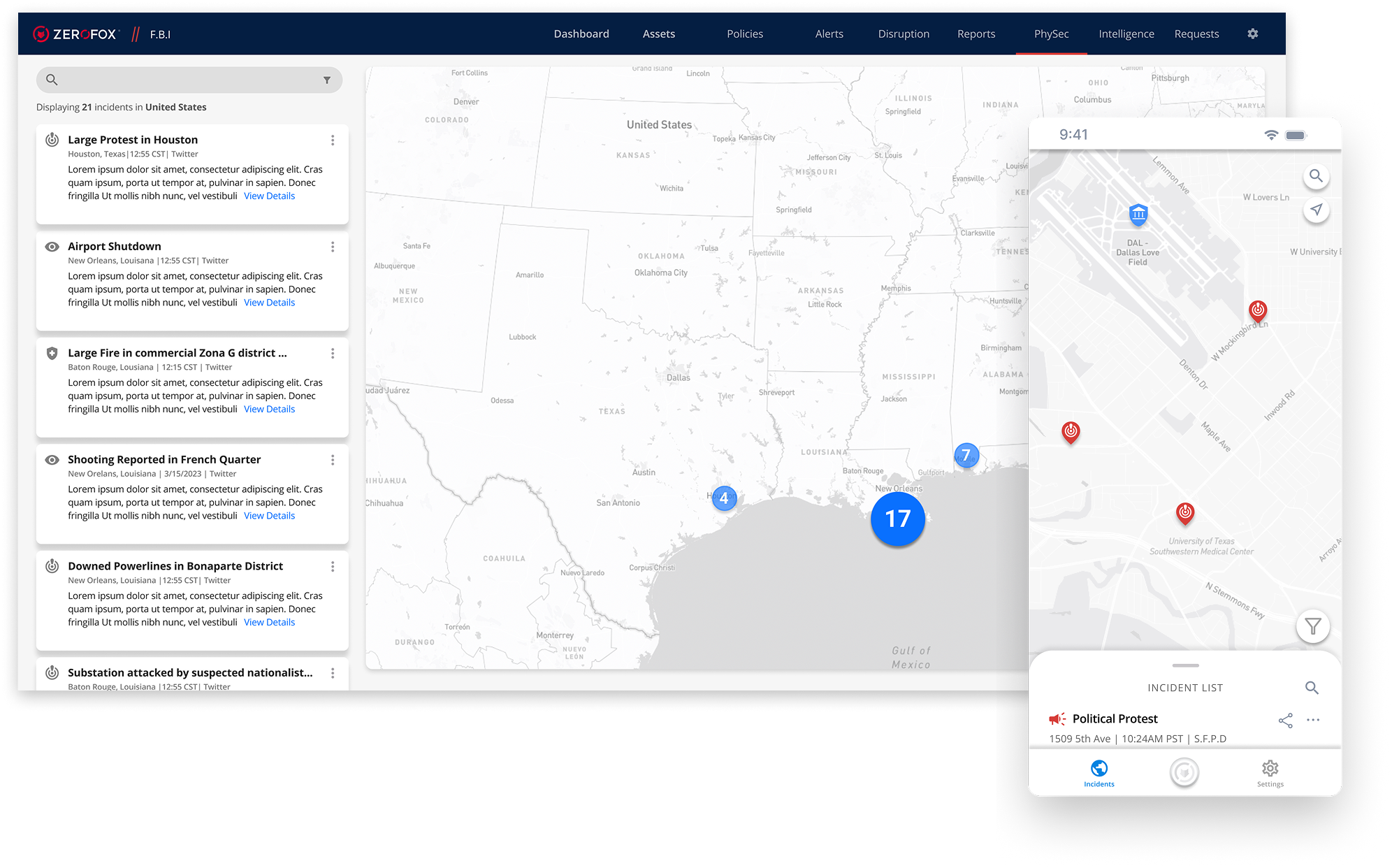
PSI desktop and mobile: one shared operational picture across devices
+ Reflection & Learnings

What this project
taught me

Lightweight discovery can prevent expensive rework, even under aggressive deadlines. And responsive design has to account for differences in user context, not only differences in screen size.

Connect research directly to product decisions

The evidence → decision → design response structure kept every screen accountable to something a real user did or said, and made design rationale legible to engineering and leadership.

Involve engineering early

Working directly with front-end developers meant designs were tested on real builds within days. The feedback loop was the methodology.

Validate user needs before committing to implementation

The desktop experience only exists because testing surfaced a second operating environment the original plan missed. Assumptions are cheap to test and expensive to ship.

What I would measure next

Time to locate and assess an incident, success rate for filtering threats within an area, time to share an incident, and user confidence in accuracy, distinguishing platform growth from improvements directly attributable to the experience.